This function returns the number of columns in an array or cell reference.
Syntax:
COLUMNS(array)
Arguments:
- array (required): An array constant or a reference to a cell range.
Background:
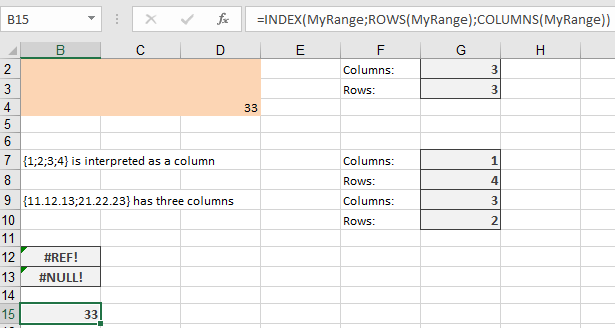
- Using a discontiguous range as an argument triggers the error:
« You’ve entered too many arguments to the function. »
- Enclosing such arguments in extra parentheses results in a #REF! error.
- If the range is defined by intersections and the intersection is empty, the function returns #NULL!.
Array constants are numbers or text that you must enclose in braces. Rows are separated by semicolons, and columns are separated by commas
- {1;2;3;4} → Interpreted as a single column:
=COLUMNS({1;2;3;4}) // Returns 1
- {11,12,13;21,22,23} → Interpreted as three columns:
=COLUMNS({11,12,13;21,22,23}) // Returns 3
Example:
Combined with ROWS(), this function helps access specific cells in a named range, particularly useful for dynamic ranges.
- If a range is named MyRange, the formula:
=INDEX(MyRange; ROWS(MyRange); COLUMNS(MyRange))
Returns a reference to the lower-right cell of the range.