
Its creates a complex number from real and imaginary components in the form x + yi or x + yj.
Syntax
COMPLEX(real_part; imaginary_part; [suffix])
Arguments
- real_part (required)
The real coefficient (x) of the complex number - imaginary_part (required)
The imaginary coefficient (y) of the complex number - suffix (optional)
The imaginary unit designation (« i » or « j »)
Default: « i » if omitted
Technical Background
Complex numbers consist of real and imaginary components. For complete details, see the Functions for Complex Numbers section.
Examples
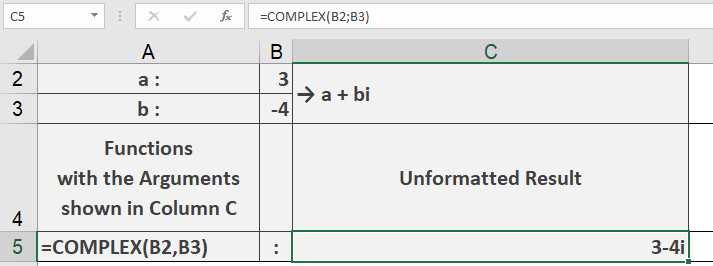
Key Features
- Supports both « i » and « j » notation for imaginary units
- Automatically inserts proper sign between components
- Returns text string representing the complex number
- Defaults to « i » suffix if not specified
Error Conditions
- Returns #VALUE! if:
- Non-numeric inputs provided
- Invalid suffix (not « i » or « j ») specified
- Too few arguments provided
Usage Notes
- The output is a text string, not a numeric value
- For engineering applications, use « j » suffix
- For mathematical applications, « i » is standard
- Components can be integer or decimal values