
This function returns the hyperbolic cosine of a number.
Syntax
COSH(number)
Argument
- number (required) – Any real number
Background
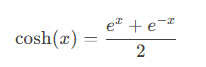
The hyperbolic cosine is part of the family of hyperbolic functions, which – like trigonometric functions – are defined for all real and complex numbers (though Excel only supports real-number arguments). The function is mathematically defined as:
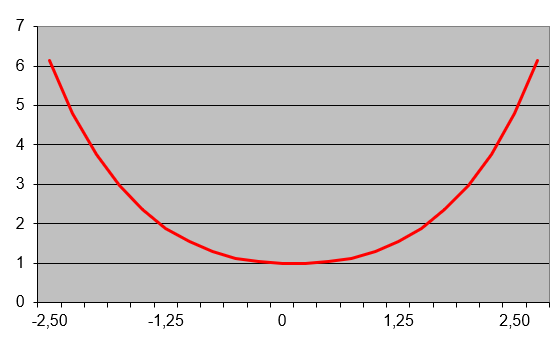
The graph of the hyperbolic cosine (shown in Figure below) displays a characteristic curve.
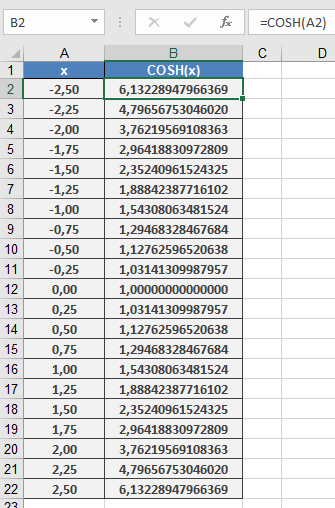
Example Calculation
Key Applications
- Catenary Curves
The hyperbolic cosine famously describes the shape of a hanging chain or cable suspended between two points (catenary). The catenary equation is:
y = a * COSH(x/a)
where:
-
- a is the vertical distance from the lowest point to the baseline
- x is the horizontal coordinate
- Scientific Uses
- Engineering analysis (suspension bridges, arches)
- Physics (relativity and wave equations)
- Mathematical modeling
Technical Notes
- Output is always ≥ 1
- Symmetric function: COSH(-x) = COSH(x)
- Grows exponentially as |x| increases
- Fundamental relationship: COSH²x – SINH²x = 1