
The COUNTA function is a function that returns the number of non-empty cells within a specified range. This function excludes empty cells from its count. The COUNTA function may also be known as the Excel COUNTIF Not Blank formula.
The COUNTA function uses the following arguments:
=COUNTA(value1; [value2]; …)
Value1 (Required Argument): This represents the first set of values to be counted.
Value2,… (Optional Argument): These are additional values to include in the count, with a maximum of 255 total arguments permitted.
USING THE COUNTA FUNCTION
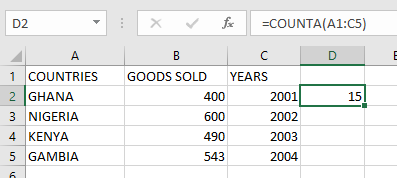
Using the table below, we will determine the number of non-empty cells by applying the COUNTA function.

To calculate the quantity of non-empty cells in your worksheet, follow these steps:
- Select an empty cell and input:
=COUNTA(A1:C5)

- Press Enter to display the result: 15 (as illustrated in the table below).
NOTE: Important considerations when working with the COUNTA function:
- Empty cells are automatically excluded from the count
- For counts excluding logical values, text, or error messages, utilize the COUNT function instead
- To implement conditional counting based on specific criteria, employ either the COUNTIF or COUNTIFS functions