
The COUNTIF function is used to count the number of cells that meet a certain criterion or condition. This can also be used to count cells that contain dates, numbers, and text. This function also supports the use of logical operators and wildcards.
The COUNTIF function has the following arguments:
=COUNTIF(Range; criteria)
Range (Required Argument): This indicates the range of cells that are to be counted.
Criteria (Required Argument): This is the condition to be met by the cells provided in the worksheet. The criteria can be in the following:
- A numerical value such as integer, decimal, time, or logical value
- A text string such as Monday, East, Price and including wildcards such as asterisks and question mark
USING THE COUNTIF FUNCTION
With the table below, let’s use the COUNTIF function to count how many times James’ name appears on the list.
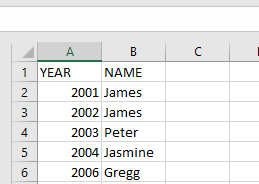
To get the number of times James’ name appears on the list, follow the steps below:
- Select an empty cell, type in the function name and the arguments to be used:
=COUNTIF(B2:B6; « James »)
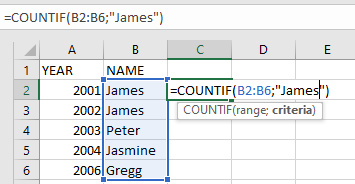
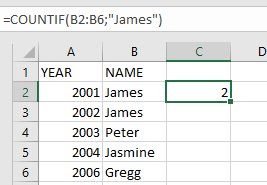
- Click on Enter and the result will be 2.
NOTE: Take note of the following points when using the COUNTIF function:
- When using the COUNTIF function, make sure the criteria argument is enclosed in quotes (e.g., « James »).
- When the provided criteria argument is a text string that is more than 255 characters in length, #VALUE! error occurs.
- #VALUE! error also occurs when the formula is referring to a cell or range of cells in a closed workbook.