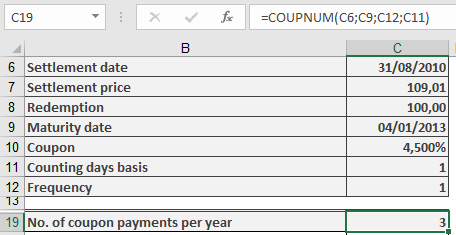
This function calculates the number of coupon payments (interest payment dates) remaining after the settlement date—i.e., how many interest payments the new owner of a fixed-interest security will receive until maturity.
Syntax. COUPNUM(Settlement; Maturity; Frequency; Basis)
Arguments
- Settlement (required): The date on which the bond is purchased or transferred (ownership changes).
- Maturity (required): The date on which the bond will be repaid (the loan ends).
- Frequency (required): Specifies the number of coupon payments per year. Valid values:
- 1 = Annual payments
- 2 = Semiannual (every six months)
- 4 = Quarterly (every three months)
- Basis (optional): Defines the day count basis used for calculations. If omitted, Excel uses Basis = 0.
Refer to Table 15-2 for available basis options:- 0 = US (NASD) 30/360
- 1 = Actual/actual
- 2 = Actual/360
- 3 = Actual/365
- 4 = European 30/360
Argument Requirements & Errors
- Date values must not include time components; any decimal portion is truncated.
- The Frequency and Basis values are also truncated to integers.
- If Settlement or Maturity is not a valid date, the function returns a #VALUE! error.
- If Frequency is not 1, 2, or 4, or if Basis is not in the range 0–4, the function returns a #NUM! error.
- If the Settlement date is later than the Maturity date, the function also returns a #NUM! error.
Background
For fixed-interest securities (bonds), coupon payments are made regularly according to the maturity date and payment frequency.
The COUPNUM() function determines how many of these payments are left after the bond is purchased.
This result is useful when calculating the present value of future payments, such as when determining the bond’s PRICE() or YIELD() at purchase.
Note that the day count basis (Basis argument) can affect results, especially for partial-year (intra-annual) periods.
Example