
This function returns a Key Performance Indicator (KPI) property and displays the KPI name within the cell.
Syntax
CUBEKPIMEMBER(connection; kpi_name; kpi_property; caption)
Arguments
- connection (required): A string representing the name of the workbook connection to the cube. Upon entering the first quotation mark, existing context-sensitive data connections will be displayed.
- kpi_name (required): Specifies the name of the KPI in the cube.
- kpi_property (required): A KPI is composed of several components, specified using an integer (see below).
Integers for the Third Argument of the CUBEKPIMEMBER() Function
lnteger MDX expression Description
1 [KPIValue] Actual value
2 [KPIGoal] Target value
3 [KPIStatus] State of the KPI at a specific moment in time
4 [KPITrend] Measure of the value over time
5 [KPIWeight] Relative importance assigned to the KPI
6 [KPICurrentTimeMember] Temporal context for the KPI
Background
Error values and messages provide information regarding incorrect or missing entries:
- If the connection name is not a valid workbook connection, the CUBEKPIMEMBER() function returns the #NAME? error.
- If the OLAP server (or the offline cube) is unavailable, an error message will appear, but the content of the affected cell will not change.
- CUBEKPIMEMBER() returns the #N/A error value when kpi_name or kpi_property is invalid.
- CUBEKPIMEMBER() might return the #N/A error if the connection to the data source is interrupted and cannot be re-established.
You can combine CUBEKPIMEMBER() with CUBEVALUE(). To do so, specify CUBEKPIMEMBER() as the second argument or a reference for CUBEVALUE().
Example
In this example, a KPI named « average » is stored in the cube. This cube calculates the average of sales and the total number of sales as integers. Both values are also saved as measures in the cube but cannot be used to calculate fields in the PivotTable. The target value (goal) is $1,500. Figure below shows the example for cookies.
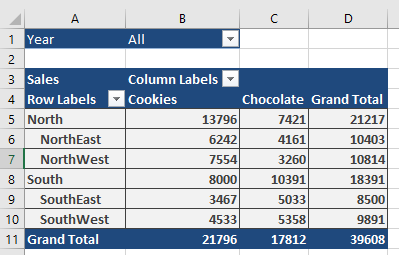
The formula =CUBEKPIMEMBER(« offline », »average »,1) displays the word « average ».

The formula =CUBEVALUE(« offline »,CUBEKPIMEMBER(« offline », »average »,1)) returns 1453 (the rounded average of all sales). In the second formula, you can also enter a reference to the cell containing the first formula as the second argument.
To get the target value of the average, use the formula =CUBEVALUE(« offline »,CUBEKPIMEMBER(« offline », »average »,2)). The value 2 in the last argument is important because, in this case, it indicates the target value.
You can use the cell containing the formula to create cell captions. The actual content of the cell becomes more informative when displayed using the CUBEVALUE() function.