
This function calculates the time interval (period) between a start date and an end date, returning the result in years, months, or days based on the specified unit.
Syntax
DATEDIF(start_date, end_date, unit)
Arguments
- start_date (required) – The beginning date of the period.
- end_date (required) – The ending date of the period.
- unit (required) – The type of interval to calculate. Available options:
- « Y » → Full years in the period.
- « M » → Full months in the period.
- « D » → Total days in the period.
- « MD » → Days remaining after whole months (ignores months and years).
- « YM » → Months remaining after whole years (ignores years and days).
- « YD » → Days remaining as if dates were in the same year (ignores years).
Background
DATEDIF() computes the difference between two dates, which can be entered as:
- Text strings (e.g., « 01/01/2020 »),
- Serial numbers (Excel’s date format), or
- Results of other formulas/functions (e.g., TODAY()).
Examples
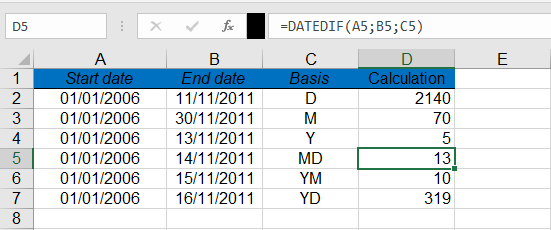
- Calculating Employment Duration (Years):
=DATEDIF(« 01/01/2006 », « 11/13/2011 », « Y »)
Result: 5 (years from January 1, 2006, to November 13, 2011).
- Calculating Employment Duration (Months):
=DATEDIF(« 01/01/2006 », « 11/30/2011 », « M »)
Result: 70 (full months between the dates).
Note:
- « MD », « YM », and « YD » units exclude higher time units (e.g., « MD » only compares days).
- Ensure end_date is later than start_date to avoid errors.