
The DAY function extracts and returns the day number (1-31) from a given date.
Syntax
DAY(serial_number)
Arguments
- serial_number (required): The date value from which to extract the day. Can be:
- A cell reference containing a date
- A date serial number
- A date entered as text in Excel-recognized format
Background
- Part of Excel’s date function family (along with YEAR() and MONTH())
- Extracts the day component for use in calculations or data analysis
- Works with Gregorian calendar dates only
- Returns #VALUE! error for invalid dates
Key Points
- Date Systems:
- Windows (1900 system): Valid dates 1/1/1900 to 12/31/9999
- Mac (1904 system): Valid dates 1/1/1904 to 12/31/9999
- Error Conditions:
- Dates outside valid range return #VALUE!
- Text that can’t be interpreted as a date returns #VALUE!
- Practical Applications:
- Extracting days for filtering or grouping
- Date-based calculations
- Data validation
Examples
| Formula | Result | Notes |
| =DAY(« 07/13/2008 ») | 13 | Standard date format |
| =DAY(« 11/14/1959 ») | 14 | Day extraction |
| =DAY(« 01/01/1900 ») | 1 | Earliest valid date in Windows system |
| =DAY(« 12/31/1899 ») | #VALUE! | Before valid date range |
| =DAY(« 12/31/9999 ») | 31 | Latest valid date |
| =DAY(« 01/01/10000 ») | #VALUE! | Beyond valid date range |
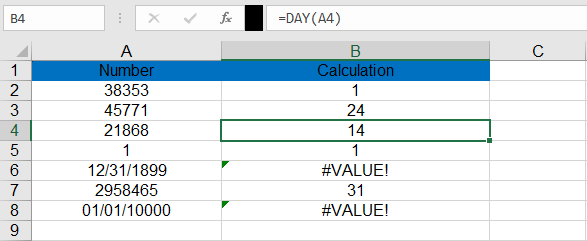
Note: For error handling with potentially invalid dates:
=IFERROR(DAY(A2), »Invalid Date »)