
The DAYS360 is use to calculates the number of days between two dates based on a 360-day year (12 months × 30 days each), commonly used in financial and accounting calculations.
Syntax
DAYS360(start_date, end_date, [method])
Arguments
- start_date (required): The beginning date of the period.
- end_date (required): The ending date of the period.
- method (optional): Specifies the calculation method:
- FALSE or omitted: U.S. (NASD) method
- If the start date is the last day of a month, it is treated as the 30th of the same month.
- If the end date is the last day of a month:
- If the start date is before the 30th, the end date becomes the 1st of the next month.
- Otherwise, the end date becomes the 30th of the same month.
- TRUE: European method
- Any 31st of a month is treated as the 30th of the same month.
- FALSE or omitted: U.S. (NASD) method
Background
- Primarily used for interest calculations in financial applications (e.g., bonds, loans).
- Returns a negative number if start_date > end_date.
- Always use the Excel percent format for interest rates (e.g., 5.25%).
Interest Calculation Formula
To compute interest over a period:
Interest = Capital × Interest Rate × DAYS360(start_date, end_date, [method]) / 360
Use ROUND() to format the result to 2 decimal places (currency format).
Example
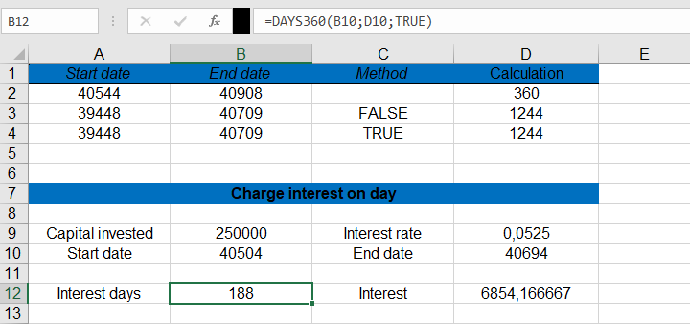
Calculate interest for $250,000 at 5.25% from November 22, 2010 (cell C12) to May 31, 2011 (cell E12):
- Calculate Days (European method):
=DAYS360(C12, E12, TRUE)
Returns: 188 days.
- Compute Interest:
=C11 * E11 * DAYS360(C12, E12, TRUE) / 360
Returns: $6,854.17.
Key Notes
- Error Handling: Ensure dates are valid (use IFERROR for robustness).
- Method Selection: Choose TRUE (European) or FALSE (U.S.) based on financial standards.