
The DDB function calculates the depreciation of an asset for a specific period using the double-declining balance method or another specified method by adjusting the factor argument. It uses the following arguments:
=DDB(cost; salvage; life; period; [factor])
- Cost (Required Argument): This is the initial cost of the asset.
- Salvage (Required Argument): This is the value of the asset at the end of its depreciation, also known as the salvage value.
- Life (Required Argument): This is the number of periods over which the asset depreciates, often referred to as the asset’s useful life.
- Period (Required Argument): This is the specific period for which the depreciation is calculated.
- Factor (Optional Argument): This is the rate at which the balance declines. If omitted, it defaults to 2 (double-declining balance method).
Using the DDB Function
Let’s calculate the depreciation of an asset with an initial cost of £300 000, a salvage value of £5 000 after 5 years, and a depreciation period of 2 years. We will use the DDB function with a factor of 1.
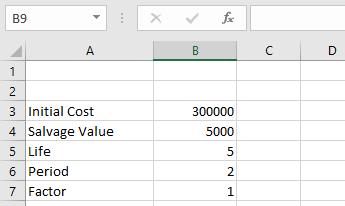
To calculate the depreciation using the DDB function:
- Select an empty cell and enter the function with its arguments:
=DDB(B3; B4; B5; B6; B7)
(Where B3 = Cost, B4 = Salvage, B5 = Life, B6 = Period, B7 = Factor)
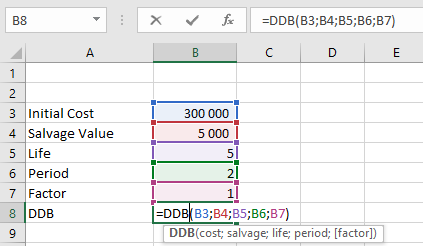
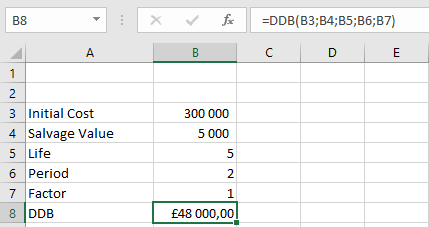
- Press Enter, and the depreciation value of the asset will be displayed as £48000,00, as shown in the table below.
Important Notes When Using the DDB Function
- A #VALUE! error occurs if any of the arguments provided are non-numeric.
- A #NUM! error occurs in the following cases:
- If the cost or salvage value is less than 0.
- If the life of the asset is less than or equal to zero.
- If the period argument is less than or equal to 0 or greater than the life value.
- If the factor argument is less than 1.