
This function returns the largest numerical value from a specified column within a list or database, based on conditions that you define.
Syntax
DMAX(database; field; criteria)
Arguments
- database (required): This is the cell range that makes up your list or database.
- field (optional): This indicates which column the function should use.
- criteria (required): This is the cell range containing the field names and the filter criteria you want to apply.
Background
Use the DMIN() and DMAX() functions to find the smallest or largest value in a database based on specific criteria. DMAX() will return a value from a database, such as the highest production volume for a product over the last five years.
Example
As a wholesaler, you have many customers and sell a wide range of products. You want to analyze your customers, sales, and products. Let’s start by finding the product and customer with the highest sales based on orders within the United States. You can achieve this using the DMAX() function.
The DMAX() function will search for the largest sales value for orders originating from the United States (see Figure below). Since you only want to know the highest sales within the United States, you’ll specify « USA » as a search criterion (B5). You won’t specify a product because you want to include all products in your search.
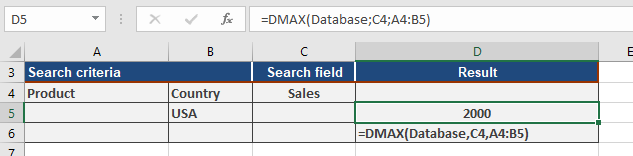
DMAX() will then return 2000, meaning the highest single order placed in the United States was for $2,000.
If you also want to know which company placed this order and what product they bought, you can perform additional calculations using the DGET() function. Figure below shows one way to do this.
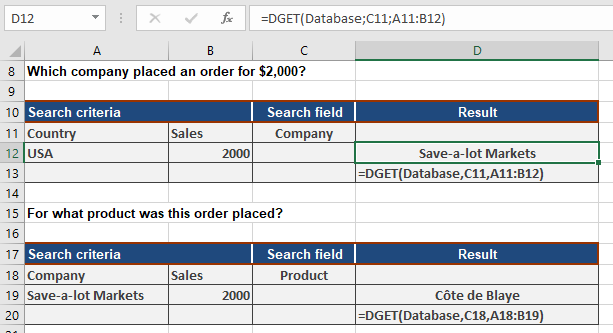
With the DMAX() function, you can quickly analyze your sales and customers.