
Converts a decimal number into a fractional representation where the decimal portion is expressed as a numerator over a specified denominator.
Syntax
DOLLARFR(Number; Factor)
Arguments
- Number (required)
The decimal number to convert (e.g., 8.25 → 8¼). - Factor (required)
The denominator of the fraction (must be a positive integer).- Truncates decimals (e.g., Factor = 4.9 → 4).
- Errors:
- #DIV/0! if Factor = 0.
- #NUMBER! if Factor < 0.
Background
Historically, U.S. stock markets priced securities in fractions (e.g., ¼, ½, ⅛). This function reverts decimals to fractional notation for compatibility with legacy systems.
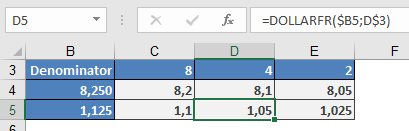
Example
Notes
- Formatting: The result displays as a decimal but represents a fraction (e.g., 8.1 = 8 + 1/4).
- Inverse Function: Use DOLLARDE() to convert fractional notation back to decimals.
- Precision: Truncates excess decimals (e.g., 1.13 with Factor = 8 → 1.1 = 1⅛).