
This function multiplies the values in a specified column within a list or database that meet the defined conditions.
Syntax
DPRODUCT(database; field; criteria)
Arguments
- database (required): The cell range that constitutes your list or database.
- field (optional): Indicates which column the function will use.
- criteria (required): The cell range containing the field names and the filter criteria.
Background
Use the DPRODUCT() function to multiply values in a list based on specified criteria.
Example
The previous wholesaler example doesn’t offer suitable data to demonstrate this function effectively, so we’ll use a different scenario.
Assume you are a real estate agent and you’ve created a database for the apartments you are trying to sell (see Figure below).
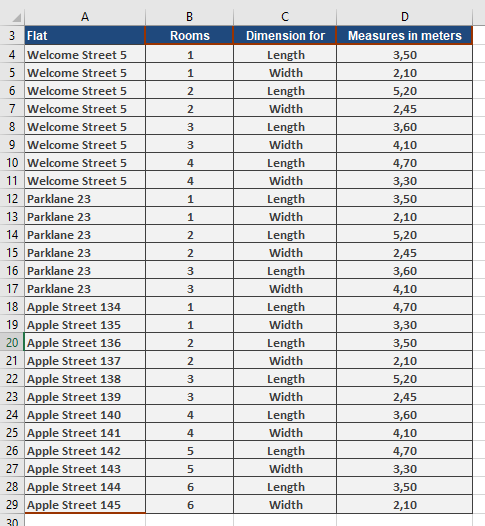
You have entered the dimensions of each room in the apartments and want to calculate the area of each room to provide this information to your customers. You can use the DPRODUCT() function to calculate the square meters. Figure below illustrates a possible solution.
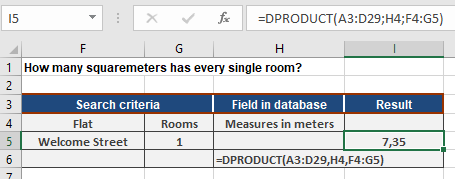
For this solution, the following arguments were used:
- Specify the cell range A3:D29 for the database argument.
- The street name and one of the rooms are used as the criteria fields (F4:G5).
- Specify cell H4 to identify the field argument.
The function returns 7.35 square meters for room 1 in the apartment on Welcome Street. If you change the value in cell G5 or the street name, you can calculate the area of other rooms in selected apartments.