
This function rounds a specified number up to the nearest even integer.
Syntax
EVEN(number)
Argument
- number (required) – The numeric value to be rounded
- Must be a numeric expression
- Returns #VALUE! error for non-numeric inputs
Background
The EVEN() function performs rounding differently than standard rounding functions:
- Always rounds away from zero to the next even integer
- Maintains the sign of the original number
- Returns the input value unchanged if it is already an even integer
- Follows mathematical definition of even numbers (integers divisible by 2)
Key Characteristics:
- Rounding direction:
- Positive numbers: rounds up to next even integer
- Negative numbers: rounds down to next even integer (more negative)
- Special cases:
- Zero (0) is considered even and returns 0
- Exact even integers return themselves
Examples:
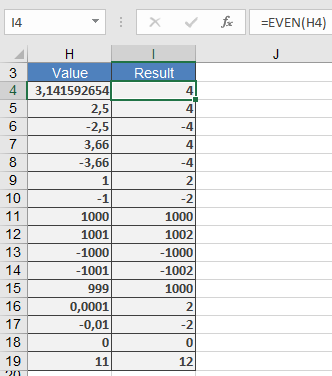
Applications:
- Financial calculations requiring even denominations
- Inventory management for paired items
- Team/group formation requiring even numbers
- Data processing with even-number constraints
Error Conditions:
- #VALUE! – Non-numeric input
- #NUM! – Extremely large numbers (Excel limitation)
Related Functions:
- ODD(): Rounds to nearest odd integer
- CEILING(): Rounds to specified multiple
- FLOOR(): Rounds down to specified multiple