
This function returns Euler’s number *e* (approximately 2.71828182845904) raised to the power of the specified number.
Syntax
EXP(number)
Argument
- number (required) – The exponent applied to base *e*
Background
The EXP() function performs exponential calculations using:
- Base *e* (Euler’s number), the fundamental constant for natural logarithms
- An irrational, transcendental number (cannot be expressed as a simple fraction)
- The inverse operation of the natural logarithm function LN()
Key Mathematical Properties:
- Relationship with LN():
EXP(LN(x)) = x and LN(EXP(x)) = x - Special Values:
- EXP(0) = 1
- EXP(1) ≈ 2.71828183 (Euler’s number)
- Growth Characteristics:
- Models continuous growth/decay processes
- Fundamental in calculus (derivative of EXP(x) is EXP(x))
Examples:
- Basic Calculations:
=EXP(1) → Returns 2.71828183 (e)
=EXP(2) → Returns 7.3890561 (e²)
=EXP(0) → Returns 1
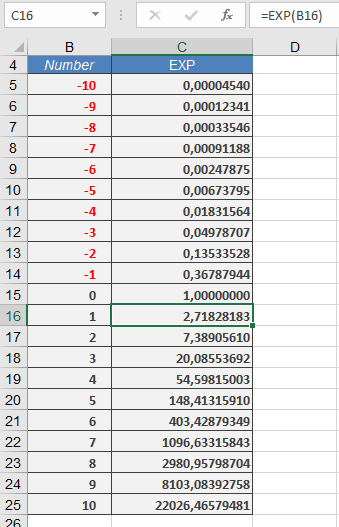
- Scientific Applications:
- Radioactive decay: =EXP(-decay_constant*time)
- Population growth: =initial_population*EXP(growth_rate*time)
- Financial Modeling:
=principal*EXP(rate*years) // Continuous compounding
Comparison with Power Operator (^):
| Method | Example | Result |
| EXP() | =EXP(1) | e (2.718…) |
| ^ | =2.71828182845904^1 | e (2.718…) |
| ^ | =2^8 | 256 (different base) |
Common Uses:
- Continuous growth/decay models
- Probability distributions
- Complex number calculations
- Differential equations solutions
- Financial continuous compounding
Note: For exponents with different bases, use the caret operator (^):
=base^exponent