
This function returns the double factorial of a specified number, which is the product of all integers with the same parity (odd/even) up to that number.
Syntax
FACTDOUBLE(number)
Argument
- number (required) – A non-negative integer (decimal values are truncated)
Key Properties:
- For even numbers:
n!! = n × (n-2) × (n-4) × … × 4 × 2 - For odd numbers:
n!! = n × (n-2) × (n-4) × … × 3 × 1 - Special cases:
0!! = 1 and 1!! = 1 - Maximum computable value in Excel: FACTDOUBLE(297) for odd, FACTDOUBLE(300) for even
Mathematical Background
Double factorials are used in:
- Advanced combinatorics
- Special function theory
- Quantum physics calculations
- Trigonometric integral solutions
Example Applications:
- Even Number Example:
=FACTDOUBLE(8) → Returns 384 (8×6×4×2)
- Odd Number Example:
=FACTDOUBLE(7) → Returns 105 (7×5×3×1)
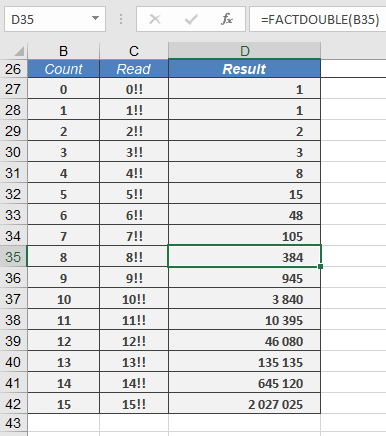
- Special Cases:
| Formula | Result | Notes |
| =FACTDOUBLE(0) | 1 | By definition |
| =FACTDOUBLE(1) | 1 | |
| =FACTDOUBLE(5.9) | 15 | Truncates to 5 |
| =FACTDOUBLE(-1) | #NUM! | Invalid input |
Error Conditions:
- #VALUE! – Non-numeric input
- #NUM! – Negative numbers or values exceeding computational limits
Comparison with FACT():
| n | FACT(n) | FACTDOUBLE(n) |
| 5 | 120 | 15 |
| 6 | 720 | 48 |
| 7 | 5040 | 105 |
Related Functions:
- FACT(): Standard factorial
- MULTINOMIAL(): Generalized factorial
- COMBIN(): Combinatorial calculations
Note: Particularly useful in physics for:
- Normalization constants in quantum mechanics
- Volume calculations in n-dimensional spheres
- Solutions to certain differential equations