
These functions locate the starting position of a substring within a text string. FIND() works with single-byte characters, while FINDB() handles double-byte characters (e.g., Asian languages). Both are case-sensitive.
Syntax:
FIND(find_text, within_text, [start_num])
FINDB(find_text, within_text, [start_byte])
Arguments:
- find_text (required): The substring to search for
- within_text (required): The text to search within
- start_num/start_byte (optional):
- Character/byte position to begin search (default=1)
- First position = 1 (not 0)
Key Features:
- Case Sensitivity:
- =FIND(« E », »excel ») → #VALUE!
- =FIND(« e », »excel ») → 1
- Error Conditions:
- Returns #VALUE! if:
- Substring not found
- start_num ≤ 0
- start_num > text length
- Using wildcards (*, ?)
- Returns #VALUE! if:
- Special Cases:
- Empty find_text (« ») returns start_num
- Works with hidden characters
Comparison with SEARCH():
| Feature | FIND() | SEARCH() |
| Case-Sensitive | Yes | No |
| Wildcards | No | Yes |
| Error Handling | Strict | Flexible |
EXAMPLE
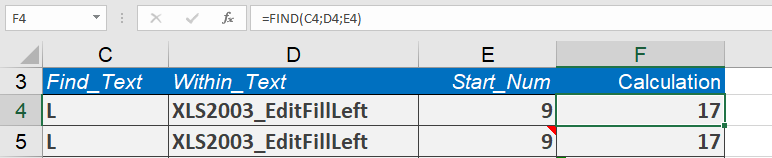
Assume that you have a string that is separated into two parts by an underscore. If you want to locate the uppercase S in the second part of the string and find its position in the string, you will first need to determine the position of the underscore to ensure that the first part is not searched.
Then you can perform the search in the remainder of the string. If cell C19 contains the string XLS2003_FormatCellSecure, the formula
=FIND(« S »,C19,FIND(« _ »,C19)+1)
returns 17, because the S in the second part of the string is located in the nineteenth position
Notes:
- For case-insensitive searches, use SEARCH()
- Combine with LEFT/RIGHT/MID for text extraction
- FINDB() essential for double-byte character systems