
The FISHERINV() function reverts a Fisher-transformed value (y) back to its original correlation coefficient (x). It is the inverse of the FISHER() function, ensuring that:
- If y = FISHER(x), then FISHERINV(y) = x.
Syntax
FISHERINV(y)
Arguments
- y (required): A numeric value representing a Fisher-transformed (z) value that you want to convert back to a correlation coefficient.
Background
Purpose
- Reverses the Fisher Transformation: Converts a normally distributed z-value (from FISHER()) back to a correlation coefficient (r).
- Critical for Averaging Correlations: After averaging Fisher-transformed values, FISHERINV() restores the result to the interpretable -1 to +1 scale.
Mathematical Formula
The inverse Fisher transformation is calculated as:
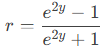
Where:
- y = Fisher-transformed (z) value.
- r = Original correlation coefficient.
Example
Context
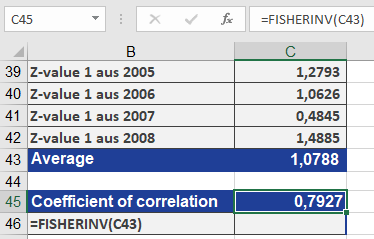
Referencing the FISHER() example:
- Transformed yearly correlation coefficients (r) into z-values using FISHER().
- Averaged the z-values.
- Applied FISHERINV() to revert the averaged z back to a single r (result: 0.7927).
Why This Matters
- Ensures valid interpretation of averaged correlations.
- Preserves the mathematical properties of correlation coefficients.
Key Takeaways
- Use Case: Revert Fisher-transformed data (z) to original correlations (r).
- Pair with FISHER(): Essential for averaging correlations or hypothesis testing.
- Output Range: Returns values between -1 and 1 (standard correlation scale).
Visual Workflow
- Original r → FISHER(r) → z (normalized).
- Average z-values.
- FISHERINV(z_avg) → Final r (interpretable result).