
Calculates the future value of an investment or loan based on periodic, constant payments and a constant interest rate.
Syntax
FV(Rate; Nper; Pmt; [Pv]; [Type])
Arguments
- Rate (required)
The interest rate per period (e.g., 4.5% annual → 4.5%/12 for monthly). - Nper (required)
The total number of payment periods (e.g., 15 years × 12 months = 180). - Pmt (optional)
The regular payment per period (annuity). Use 0 if omitted.- Sign Convention:
- Negative (-): Cash outflow (e.g., deposits, loan payments).
- Positive (+): Cash inflow (e.g., withdrawals, dividends).
- Sign Convention:
- Pv (optional)
The present value (initial lump sum). Defaults to 0. - Type (optional)
- 0 (default): Payments at end of period (ordinary annuity).
- 1: Payments at start of period (annuity due).
Error Handling
- Ensure Rate, Nper, Pmt, and Pv are numeric to avoid #VALUE!.
- Nper must be ≥ 1.
Background
FV() solves the time value of money equation:

Examples
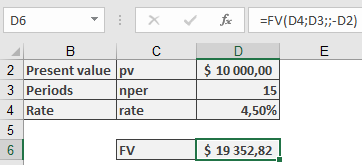
- Compound Interest (Lump Sum)
- Scenario: $10,000 invested at 4.5% annual interest for 15 years.
- Formula:
=FV(4.5%, 15, , -10000) → **$19,352.82**
-
- Note: Pv is negative (cash outflow).
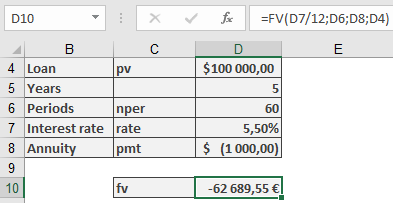
- Loan Repayment (Residual Debt)
- Scenario: $100,000 loan at 5.5% annual interest, $1,000 monthly payments for 5 years.
- Formula:
=FV(5.5%/12, 5*12, -1000, 100000) → **$62,689.55** (remaining balance)
Key Notes
- Sign Convention: Payments out are negative; inflows are positive.
- Compounding: For loans, interest is typically nominal (e.g., monthly rate = annual rate/12).
- Annuity Types: Type=1 for payments at period start (e.g., leases).