
Calculates the future value of an initial investment (Principal) after applying a series of variable compound interest rates over successive periods.
Syntax
FVSCHEDULE(Principal; Schedule)
Arguments
- Principal (required)
The initial investment amount. Must be a numeric value. - Schedule (required)
An array of interest rates for each period (e.g., {0.02, 0.03, 0.025}).- Can be a range reference (e.g., C2:C7) or a hardcoded array (e.g., {0.01, 0.02}).
- Non-numeric values → #VALUE! error.
- Empty cells → Treated as 0% interest for that period.
Key Features
- Variable Rates: Each period’s interest rate can differ (unlike FV(), which uses a fixed rate).
- Compound Interest: Interest earned in each period is reinvested.
Example
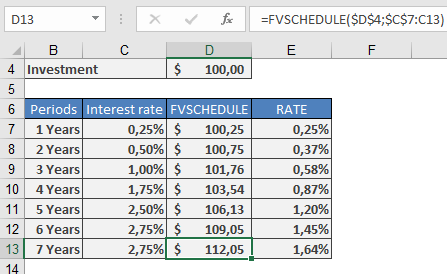
German Federal Savings Bonds (Type B)
Scenario: A €100 bond with annual interest rates as follows:
| Year | Interest Rate |
| 2010–2011 | 0.25% |
| 2011–2012 | 0.50% |
| 2012–2013 | 1.00% |
| 2013–2014 | 1.75% |
| 2014–2015 | 2.50% |
| 2015–2016 | 2.75% |
| 2016–2017 | 2.75% |
Calculation:
=FVSCHEDULE(100; {0.0025; 0.005; 0.01; 0.0175; 0.025; 0.0275; 0.0275})
Result: €112.23 (future value after 7 years).
Practical Use Cases
- Savings Bonds: Calculate maturity value with fluctuating annual rates.
- Variable-Rate Investments: Project returns for funds with non-fixed yields.
- Loan Analysis: Estimate future debt under changing interest terms.
Comparison to FV()
| Feature | FVSCHEDULE() | FV() |
| Interest Rates | Variable per period | Fixed for all periods |
| Compounding | Automatic | Requires manual adjustment |
| Use Case | Bonds, variable-rate accounts | Fixed annuities, loans |
Notes
- Negative Rates: Supported (e.g., -0.01 for a 1% loss in a period).
- Zero Rates: Omit or use 0 (no growth for that period).
- Equivalent Fixed Rate: Use RATE() to find the constant rate yielding the same result.