This function returns the natural logarithm of the gamma function, Γ(*x*).
Syntax:
GAMMALN(x)
Arguments:
- x (required) – The value for which you want to calculate GAMMALN().
Background:
The GAMMALN() function returns the natural logarithm (base *e*) of the gamma function.
A logarithm of a number is the exponent to which a fixed base must be raised to produce that number. Common logarithms include:
- Natural logarithm (ln): Base *e* (Euler’s number ≈ 2.71828)
- Base-10 logarithm (log₁₀)
- Base-2 logarithm (log₂)
The logarithm (to base *b*) of a number *y* is the exponent by which *b* must be raised to obtain *y*. Thus, the logarithmic function is the inverse of the exponential function.
Calculation:
GAMMALN(x) is computed as:
ln(Γ(x))ln(Γ(x))

where Γ(x) is the gamma function.
Example:
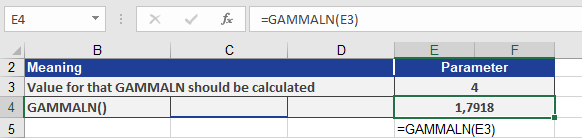
To calculate GAMMALN(4), refer to Figure below, which illustrates the computation.
The GAMMALN() function returns the natural logarithm 1.7918 for the gamma function evaluated at *x* = 4.