
This function returns the geometric mean of a set of positive numbers. The geometric mean is particularly useful for calculating average growth rates (e.g., compound interest, variable returns, or percentage-based trends).
The geometric mean is computed as the n-th root of the product of all values, where n is the number of values:

Syntax:
GEOMEAN(number1; [number2]; …)
Arguments:
- number1 (required) – The first number or range for calculation.
- number2, … (optional) – Additional numbers or ranges (up to 255 in modern Excel).
- Note: Arguments can be supplied as individual values, arrays, or cell references.
Background:
The geometric mean is ideal for analyzing percentage-based changes (e.g., growth rates, inflation, or multiplicative processes), where the arithmetic mean would produce misleading results.
Example:
Scenario:
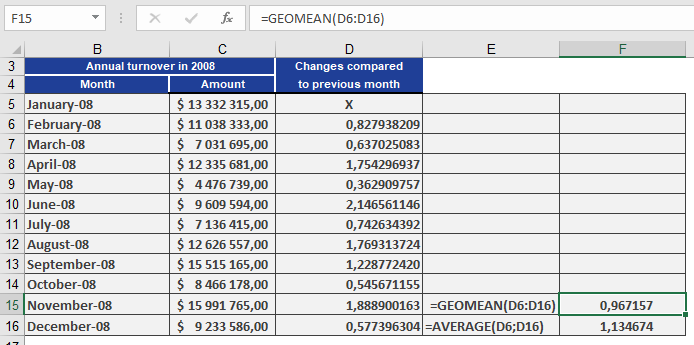
As a controlling manager at a software company, you want to determine the average monthly sales growth rate over a period.
Problem:
- Using the arithmetic mean would overestimate growth (e.g., showing 113% average growth).
- The geometric mean correctly reflects the compounded trend, revealing an average 97% growth factor (i.e., a 3% decline).
Steps:
- Calculate monthly growth factors (current month / previous month).
- Apply GEOMEAN() to these factors to derive the true average growth rate.
Result:
The geometric mean (97%) indicates a net decline, while the arithmetic mean (113%) falsely suggests growth.
Key Insight:
- Geometric mean = Accurate for multiplicative processes (e.g., finance, biology).
- Arithmetic mean = Misleading for volatile or percentage-based data.