
Its converts a hexadecimal (base-16) number to its octal (base-8) equivalent using two’s complement notation.
Syntax
HEX2OCT(number; [places])
Arguments
- number (required)
- Hexadecimal string (10-character maximum)
- Valid range: « FFE0000000 » to « 1FFFFFFF »
(-536,870,912 to +536,870,911 decimal) - Case-insensitive (A-F accepted in any case)
- places (optional)
- Specifies minimum output digits (1-10)
- Adds leading zeros for positive numbers
- Ignored for negative numbers (always 10 digits)
Technical Specifications
| Characteristic | Details |
| Input Range | Negative: « FFE0000000 » to « FFFFFFFFF » Positive: « 0 » to « 1FFFFFFF » |
| Output Range | Negative: 10-digit octal Positive: 1-10 digit octal |
| Special Handling | Truncates fractions, negative values ignore places parameter |
| Case Sensitivity | None (A-F and a-f treated identically) |
Examples
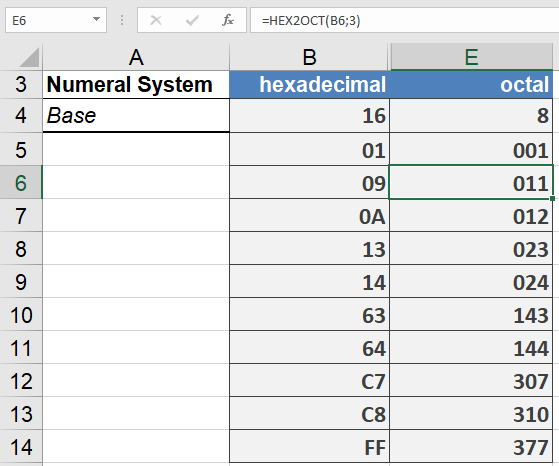
Common Use Cases
- Unix/Linux permission management
- Legacy system interfaces
- Embedded systems debugging
- Digital signal processing
Error Handling
- #NUM! Error:
- Input exceeds valid range
- Result requires more digits than specified places
- More than 10 hex characters
- #VALUE! Error:
- Contains non-hex characters (G-Z, symbols)
- Empty string input