
The HLOOKUP function (where « H » stands for Horizontal) is used to search for a specific value in the top row of a table or dataset and retrieve corresponding data from another row in the same column.
The syntax for the HLOOKUP function is as follows:
=HLOOKUP(lookup_value; table_array; row_index_num; [range_lookup])
Arguments:
- lookup_value (Required): The value to search for in the first row of the table.
- table_array (Required): The range of cells containing the data to be searched.
- row_index_num (Required): The row number (within the table array) from which to return the matching value.
- range_lookup (Optional): Specifies whether to find an exact match (FALSE) or an approximate match (TRUE).
- If TRUE (or omitted), it finds the closest match (or next largest value if no exact match exists).
- If FALSE, it returns an exact match or #N/A if no match is found.
USING THE HLOOKUP FUNCTION
Consider the following example table containing student names and their scores in different subjects. We will use HLOOKUP to find Joy’s score in Mathematics.
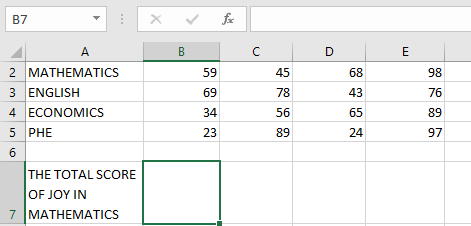
Steps to Find Joy’s Math Score:
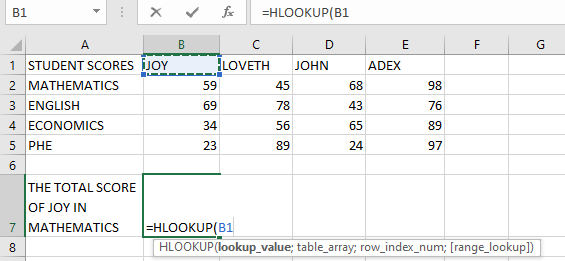
- Select an empty cell and begin the HLOOKUP function with the lookup_value (e.g., cell B1 containing « Joy »):
=HLOOKUP(B1;
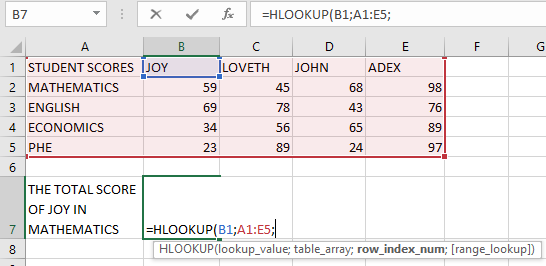
- Define the table_array (the range where data is stored, e.g., A1:E5):
=HLOOKUP(B1; A1:E5;
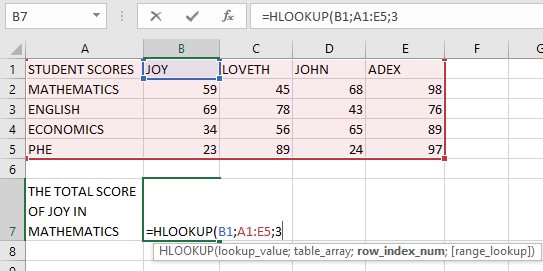
- Specify the row_index_num (the row containing the return value, e.g., 3 for « Math »):
=HLOOKUP(B1; A1:E5; 3;
- Choose between exact or approximate match (use FALSE for exact, TRUE for approximate):
=HLOOKUP(B1; A1:E5; 3; FALSE)
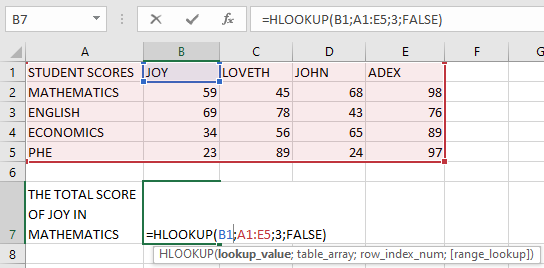
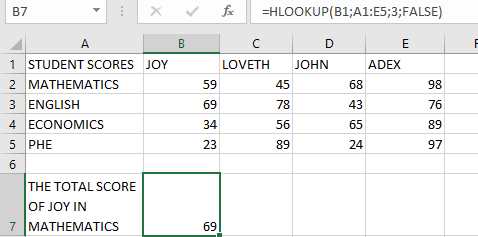
- Press Enter, and the result should be 59 (Joy’s Math score).
NOTES WHEN USING THE HLOOKUP FUNCTION
- Like VLOOKUP, HLOOKUP is not case-sensitive (treats « JOY » and « joy » the same).
- Wildcards (*, ?, ~) can be used for partial matches.
- Only the first matching value is returned if duplicates exist.
Common Errors:
- #N/A! → No match found when range_lookup is FALSE.
- #REF! → Occurs if row_index_num exceeds the table’s row count.
- #VALUE! → Occurs if:
- row_index_num is less than 1.
- Non-numeric row_index_num is provided.