
Its extracts the hour component from a time value (with or without an associated date). Returns an integer between 0 (midnight) and 23 (11 PM).
Syntax
HOUR(serial_number)
Arguments
- serial_number (required):
- A valid time value
- Can be entered as:
- Time string in quotes (e.g., « 06:43 »)
- Decimal number representing time (e.g., 0.27986111 for 06:43)
- Result of other formulas/functions
- Cell reference containing time/date
Background
Part of Excel’s time function family (along with MINUTE() and SECOND()). Used to:
- Extract hour components for calculations
- Analyze time-based data
- Create time-dependent formulas
Example
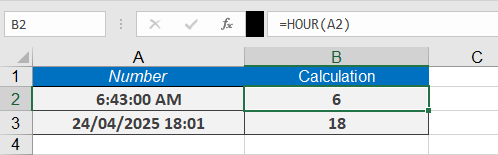
If you want to extract the hours from a time value, you can use the formula
=HOUR(« 06:43 »)
which returns 6 hours.
Here are some more examples:
=HOUR(« 24/04/2025 18:01 ») returns 18.
=HOUR(NOW()) returns the current hour.
Notes
- Returns #VALUE! for invalid time formats
- For decimal inputs:
- 0.0 = 12:00 AM
- 0.5 = 12:00 PM
- 0.999 = 11:59 PM
- Combine with MINUTE() and SECOND() for complete time breakdown