
The IFERROR function is used to return a custom result when a formula produces an error. It provides a simple way to handle errors without complex nested IF statements.
The IFERROR function uses the following syntax:
=IFERROR(value; value_if_error)
Arguments:
- Value (Required): The formula or expression to be checked for errors
- Value_if_error (Required): The result to return if an error is detected
USING THE IFERROR FUNCTION
Using the table below, we’ll apply the IFERROR function to replace errors with the message « invalid data »:
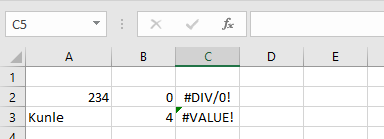
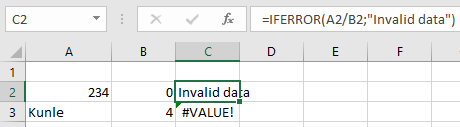
To correct the error in cell C2:
- Select an empty cell
- Enter the formula:
=IFERROR(A2/B2; « invalid data »)
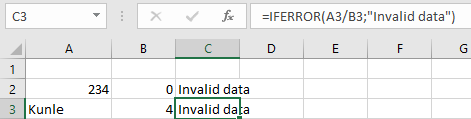
To correct the error in cell C3:
- Select an empty cell
- Enter the formula:
=IFERROR(A3/B3; « invalid data »)
IMPORTANT NOTES ABOUT THE IFERROR FUNCTION
- If either value or value_if_error refers to an empty cell, IFERROR treats it as an empty string (« »)
- When applied to an array formula, IFERROR returns an array of results for each cell in the specified range
- Common errors handled by IFERROR include:
- #N/A
- #VALUE!
- #REF!
- #DIV/0!
- #NUM!
- #NAME?
- #NULL!
The IFERROR function simplifies error handling in formulas while maintaining spreadsheet clarity and efficiency.