
This function calculates the argument (phase angle Φ) in radians of a complex number given in rectangular form (x + yi or x + yj).
Syntax
IMARGUMENT(complex_number)
Argument
- complex_number (required)
A text string representing a complex number in either:- « x+yi » format (mathematical convention)
- « x+yj » format (engineering convention)
Technical Background
For a complex number z = x + yi:
- The argument Φ is the angle in the complex plane
- Calculated as: Φ = atan2(y, x)
- Range: -π < Φ ≤ π radians
- Relates to trigonometric form: |z|·(cosΦ + i·sinΦ)
Example
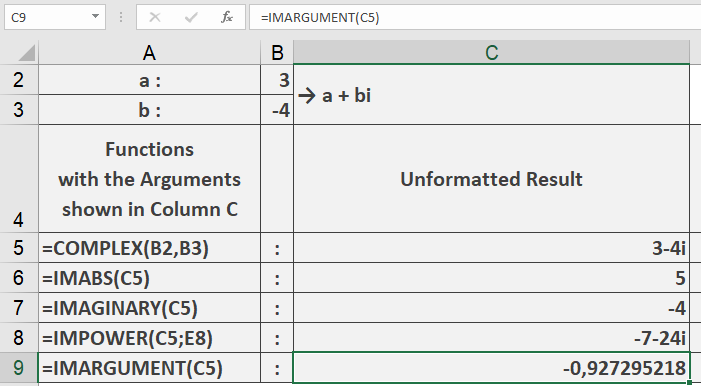
=IMARGUMENT(« 3-4i ») // Returns -0.927295218 radians
Additional Examples
=IMARGUMENT(« 1+i ») // Returns 0.785398163 (π/4 radians)
=IMARGUMENT(« -1-i ») // Returns -2.35619449 (-3π/4 radians)
=IMARGUMENT(« 0+1j ») // Returns 1.570796327 (π/2 radians)
=IMARGUMENT(« 5 ») // Returns 0 (pure real number)
Key Features
- Returns angle in radians (-π to π)
- Supports both « i » and « j » notation
- Handles all four quadrants of complex plane
- Returns 0 for positive real numbers
- Returns π for negative real numbers
Error Conditions
- Returns #NUM! for:
- Invalid complex number format
- Non-numeric components
- Empty string
Usage Notes
- To convert result to degrees, use DEGREES() function
- For zero (0+0i), returns 0 by convention
- Angle sign follows standard mathematical convention:
- Positive for upper half-plane
- Negative for lower half-plane