
Its calculates the cosine of a complex number in rectangular form (x + yi or x + yj).
Syntax
IMCOS(complex_number)
Argument
- complex_number (required)
A text string representing a complex number in either:- « x+yi » format (mathematical convention)
- « x+yj » format (engineering convention)
Technical Background
For a complex number z = x + yi:
- Complex cosine is calculated as:
cos(z) = cos(x)cosh(y) – i·sin(x)sinh(y) - Uses Euler’s formula extension to complex plane
- Combines trigonometric and hyperbolic functions
Example
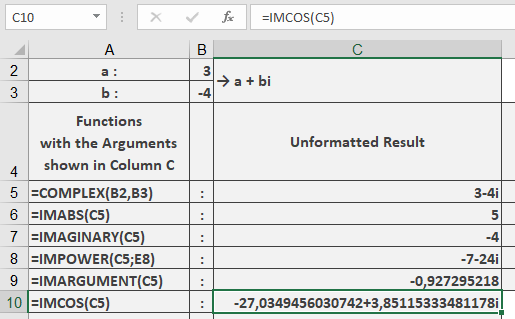
=IMCOS(« 3-4i ») // Returns « -27.0349456+3.85115334i »
Additional Examples
=IMCOS(« 1+i ») // Returns « 0.833730025-0.988897706i »
=IMCOS(« 0+πi ») // Returns « 11.59195328 » (real number)
=IMCOS(« π/2-i ») // Returns « 1.543080635i » (pure imaginary)
Key Features
- Returns result in standard complex form
- Preserves input’s imaginary unit convention
- Handles all complex number formats
- Maintains periodicity properties in complex plane
Error Conditions
- Returns #NUM! for:
- Invalid complex number format
- Non-numeric components
- Missing imaginary unit when needed
Usage Notes
- For real numbers (y=0), reduces to standard cosine
- For pure imaginary numbers (x=0), becomes hyperbolic cosine:
cos(iy) = cosh(y) - Essential for:
- Complex analysis
- Wave propagation modeling
- Quantum mechanical calculations