
Its computes the principal value of the base-10 logarithm of a complex number, returning the result in rectangular form (x + yi). This is the complex analog of the standard LOG10() function.
Syntax
IMLOG10(complex_number)
Argument
- complex_number (required)
A complex number in either:- « x+yi » format (mathematical convention)
- « x+yj » format (engineering convention)
Technical Background
For a complex number z = x + yi:
IMLOG10(z) = (log₁₀e)·IMLN(z) ≈ 0.434294482·IMLN(z)
Where:
- IMLN(z) is the complex natural logarithm
- log₁₀e ≈ 0.434294481903252
Example
=IMLOG10(« 3-4i ») // Returns « 0.698970004-0.402719196i »
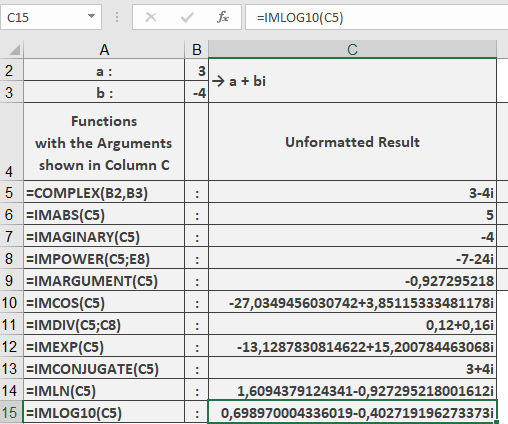
Additional Examples
=IMLOG10(« 1+i ») // Returns « 0.150514998+0.341094088i »
=IMLOG10(« -100 ») // Returns « 2+1.364376354i »
=IMLOG10(« 0+10i ») // Returns « 1+0.682188177i »
=IMLOG10(« 1000 ») // Returns « 3 » (standard real logarithm)
Key Features
- Returns the principal value (-π < Im ≤ π)
- Maintains 9 decimal place precision
- Handles all valid complex number formats
- Consistent with real LOG10() for positive reals