
Its raises a complex number to a specified real power, returning the result in rectangular form (x + yi). This is the complex analog of the POWER() function.
Syntax
IMPOWER(complex_number; power)
Arguments
- complex_number (required)
A complex number in either:- « x+yi » format (mathematical convention)
- « x+yj » format (engineering convention)
- power (required)
The real-valued exponent which can be:- Integer (positive or negative)
- Fractional/rational number
- Decimal value
Technical Background
Using de Moivre’s Formula for z = x + yi = r(cosΦ + i·sinΦ):
zⁿ = rⁿ·[cos(nΦ) + i·sin(nΦ)]
Where:
- r = √(x² + y²) (magnitude)
- Φ = atan2(y,x) (phase angle)
- n = power
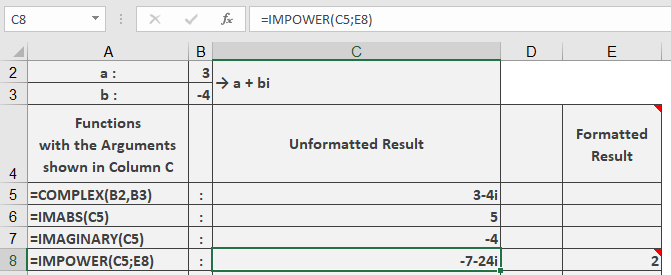
Example
=IMPOWER(« 3-4i », 2) // Returns « -7-24i »
Additional Examples
=IMPOWER(« 1+i », 3) // Returns « -2+2i »
=IMPOWER(« 2+0i », 0.5) // Returns « 1.414213562 » (√2)
=IMPOWER(« 0+1i », -1) // Returns « 0-1i » (1/i = -i)
=IMPOWER(« -1 », 1/3) // Returns « 0.5+0.866025404i » (principal cube root)
Key Features
- Handles all real exponents (integer, fractional, negative)
- Returns principal value (-π < arg ≤ π)
- Maintains 9 decimal place precision
- Preserves input’s imaginary unit convention
Error Conditions
- Returns #NUM! for:
- Invalid complex number format
- Non-numeric components
- Zero magnitude with non-positive power