
This function returns the difference between two complex numbers, which must be strings in the format x + yi or x + yj.
Syntax
IMSUB(complex_number1; complex_number2)
Arguments
- complex_number1 (required)
The complex minuend (number to be subtracted from) - complex_number2 (required)
The complex subtrahend (number to subtract)
Background
The difference between two complex numbers is calculated by separately subtracting their real and imaginary components:
(a + bi) – (c + di) = (a – c) + i·(b – d)
The basics of complex numbers are described in the section titled Functions for Complex Numbers.
Example
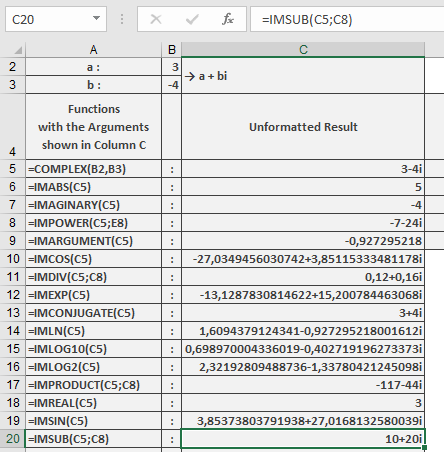
The following example illustrates this function:
=IMSUB(« 3-4i », »-7-24i ») returns 10+20i
Key Features
- Handles both « i » and « j » notation
- Maintains component-wise precision
- Preserves the imaginary unit from the first argument
- Returns result in standard rectangular form
Technical Notes
- Real and imaginary parts are subtracted independently
- For complex conjugates:
(a+bi) – (a-bi) = 0+2bi - Essential for:
- Complex vector calculations
- Circuit analysis
- Signal processing
Error Conditions
- Returns #NUM! for:
- Invalid complex number format
- Non-numeric components
- Mismatched imaginary units