
This function converts a text string into a cell reference or named range.
Syntax:
INDIRECT(reference; [A1])
Arguments:
- reference (required) – A text string that can be interpreted as a valid cell reference (e.g., « A1 », « Sheet1!B5 ») or a named range.
- A1 (optional) – A logical value (TRUE/FALSE) that determines the reference style:
- TRUE or omitted → Uses A1 notation (e.g., « B2 »).
- FALSE → Uses R1C1 notation (e.g., « R2C2 » for cell B2).
Background:
- If reference is not a valid cell or range, the function returns #REF!.
- External references (to other workbooks) require the source workbook to be open.
Examples:
- Using Cell Addresses:
- Combines with ADDRESS() to convert a generated string into a reference.
- Example:
=INDIRECT(ADDRESS(2; 3)) // Returns the value in cell C2.
- Investment Analysis:
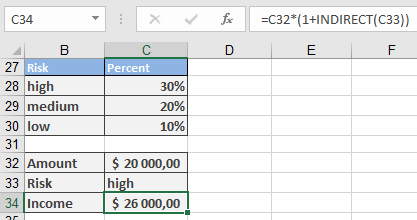
- A simplified model lets users input « high », « medium », or « low » to fetch corresponding yields.
- Named ranges:
- high = C28 (e.g., 8%),
- medium = C29 (e.g., 5%),
- low = C30 (e.g., 2%).
- Formula:
=C32 * (1 + INDIRECT(C33))
-
-
- If C33 contains « high », INDIRECT(C33) fetches the value from C28.
- With C32 (investment capital) = $1000, the result is $1080 (for 8% yield).
-
Key Notes:
- Dynamic References: Useful for creating flexible formulas where the target cell changes based on input.