
Calculates the Internal Rate of Return (IRR)—the discount rate that makes the Net Present Value (NPV) of a series of cash flows equal to zero.
Syntax
IRR(Values; [Guess])
Arguments
| Argument | Description |
| Values (required) | A range/array of cash flows (negative = outflows, positive = inflows). Must include at least one negative and one positive value. |
| Guess (optional) | Initial estimate for IRR (default: 10%). Helps avoid calculation errors in complex cash flows. |
Key Features
- Purpose: Evaluates profitability of investments/projects.
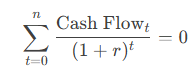
- Formula: Solves for rr in:
- Limitations:
- May return multiple solutions for irregular cash flows.
- Fails if cash flows are all positive/negative (#NUM! error).
Examples
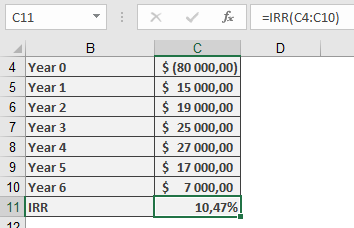
- Machine Investment
- Initial Cost: -$80,000 (Year 0).
- Annual Surpluses:
| Year | Cash Flow |
| 1 | $15,000 |
| 2 | $19,000 |
| … | … |
| 6 | $7,000 |
-
- Calculation:
=IRR(B2:B8) → **10.47%**
-
- Interpretation: IRR (10.47%) > Hurdle Rate (10%) → Viable investment.
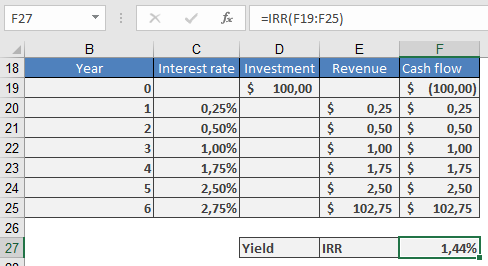
- Federal Savings Bond
- Cash Flows: Fixed annual interest payments.
- Result:
=IRR(C2:C8) → **1.44%**
-
- Note: Matches the German Federal Bank’s published yield.
Practical Tips
- Guess Argument: Use for complex cash flows (e.g., IRR(Values, 5%)).
- Validation: Cross-check with NPV(IRR(Values), Values) ≈ 0.
- Alternatives: Use XIRR() for irregularly timed cash flows.
Common Errors
| Error | Cause | Fix |
| #NUM! | No convergence after 20 iterations. | Adjust Guess or verify cash flow signs. |
| #VALUE! | Non-numeric data in Values. | Ensure all inputs are numbers. |