
Calculates the simple interest accrued for a specific period within a year, based on a fixed annual interest rate. Unlike standard compound interest functions, ISPMT() assumes no intra-period compounding.
Syntax
ISPMT(Rate; Per; Nper; Pv)
Arguments
| Argument | Description |
| Rate | Annual interest rate (e.g., 6%). |
| Per | Period number (zero-based) or days elapsed (if Nper = 360). |
| Nper | Total periods in a year (e.g., 12 for months, 360 for days). |
| Pv | Principal amount (use negative for cash outflow, e.g., -100). |
Key Features
- Simple Interest Only: Interest is linear (no compounding).
- Formula:

- Use Case: Legacy systems (e.g., Lotus 1-2-3 compatibility) or scenarios where compounding is irrelevant (e.g., short-term loans).
Examples
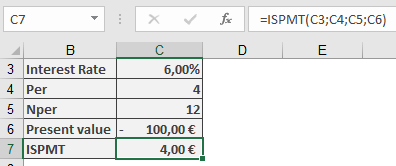
- Savings Account (Monthly Periods)
- Deposit: $100 on April 30 (Month 4 of 12).
- Annual Rate: 6%.
- Interest for Remaining Year:
=ISPMT(6%, 4, 12, -100) → **$4.00**
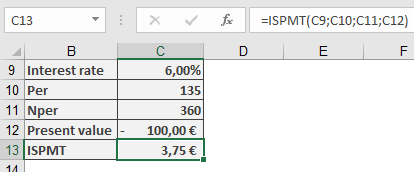
- Daily Interest Calculation
- Deposit: $100 on May 5 (Day 135 of 360).
- Interest for Remaining Year:
=ISPMT(6%, 135, 360, -100) → **$3.75**
Comparison to IPMT()
| Feature | ISPMT() | IPMT() |
| Interest Type | Simple (linear) | Compound (annuity repayment) |
| Usage | Legacy compatibility | Modern loan/deposit analysis |
| Periods | Zero-based counting | One-based counting |
Limitations
- No Compounding: Not suitable for investments/loans with intra-period compounding.
- Negative Periods: Returns erroneous values if Per ≥ Nper.