
Returns TRUE if the value is a valid cell reference (including named ranges). Returns FALSE for all other inputs (numbers, text, invalid references).
Syntax
ISREF(value)
Key Features
What Returns TRUE?
✔ Standard references (A1, Sheet2!B5)
✔ Named ranges (« Sales Data »)
✔ Structured references (Table1[Column1])
What Returns FALSE?
✖ Numbers/text (123, « A1 »)
✖ Formulas (SUM(A1:A10))
✖ Invalid references (-B1, XYZ!A1 for non-existent sheets)
Special Cases
⚠ Returns TRUE for references to non-existent sheets/tables (e.g., SheetX!A1), as Excel only validates syntax, not existence.
Practical Applications
- Safeguarding Named Ranges
Prevent #NAME? errors when a named range might be deleted:
=IF(ISREF(ABC), AVERAGE(ABC), « Error: Named range ‘ABC’ was deleted »)
- Dynamic Formula Validation
Check if a cell contains a valid reference before using:
=IF(ISREF(INDIRECT(B1)), « Valid reference », « Invalid input »)
- Conditional Formatting
Highlight cells containing references:
=ISREF(A1) // Applies formatting to reference-containing cells
Example Breakdown
Scenario
A workbook uses a named range ABC for calculations. To avoid #NAME? errors if ABC is deleted:
Original (Risky):
=AVERAGE(ABC) // Fails with #NAME? if ABC is deleted
Protected Version:
=IF(ISREF(ABC), AVERAGE(ABC), « removed Named ABC « )
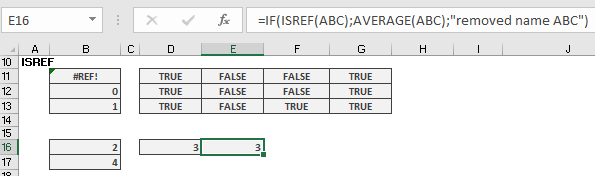
Behaviour:
- If ABC exists → Returns average
- If ABC is deleted → Shows friendly message
Limitations
- Cannot detect circular references or broken links.
- Returns TRUE for syntactically valid but non-existent references (e.g., Sheet99!A1).
For robust reference checking, combine with other functions like IFERROR() or ISERROR().