
Returns the kurtosis of a dataset, which measures the « tailedness » and peakedness of a distribution compared to a normal distribution.
Syntax:
KURT(number1; [number2]; …)
Arguments
| Argument | Required? | Description |
| number1 | Yes | First data point or range. |
| number2, … | Optional | Additional data points |
Notes:
- Accepts arrays or cell ranges (e.g., A1:A10).
- Requires at least 4 data points; otherwise, returns #DIV/0!.
Background
Kurtosis Types:
- Mesokurtic (kurtosis = 0): Matches a normal distribution.
- Leptokurtic (kurtosis > 0): Sharper peak, heavier tails (e.g., financial returns).
- Platykurtic (kurtosis < 0): Flatter peak, thinner tails (e.g., uniform distribution).
Formula:
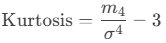
Where:
- m4m4: Fourth central moment.
- σσ: Standard deviation.
- Subtracting 3 adjusts for comparison to a normal distribution (excess kurtosis).
Example: Website Click Analysis
Scenario:
A software company evaluates click distributions:
- Download Area: Kurtosis = –1.27 (platykurtic).
- Entire Website: Kurtosis = 0.42 (leptokurtic).

Interpretation:
| Distribution | Kurtosis | Shape | Implication |
| Download Area | –1.27 | Flatter than normal | Clicks are more spread out, fewer extreme values. |
| Entire Website | 0.42 | Peaked with heavier tails | Clicks cluster around the mean, with more outliers. |
Key Takeaways
- High Kurtosis (>0):
- Sharp peak, frequent outliers.
- Common in financial data (e.g., stock market crashes).
- Low Kurtosis (<0):
- Broad peak, fewer outliers.
- Seen in uniform distributions (e.g., dice rolls).
- Use Cases:
- Risk assessment (finance).
- Quality control (manufacturing).
Excel Tip: Combine with SKEW() to fully describe distribution shape.