
The LEFT function returns the first characters of a string. The LEFTB function is used for double-byte characters and returns the first bytes.
Syntax
LEFT(text; num_chars)
LEFTB(text; num_bytes)
Arguments
- text(required): The string containing the characters you want to extract.
- num_chars/num_bytes(optional): Specifies how many characters/bytes to extract.
Background
Use the LEFT function to extract the first part of a string. You can enter letters or numbers in the text argument. The functions LEFT, RIGHT, and MID are especially useful if strings follow a specific pattern, such as ZIP codes, locations, or ISBNs.
The num_chars argument must be greater than or equal to 0. If num_chars exceeds the length of the text argument, LEFT() returns the entire string. If num_chars is omitted, the default value is 1.
Example
A list of names is entered into a spreadsheet column, with the first name separated from the last name by a space. Cell H4 contains a name.
The following formula extracts the first name:
=LEFT(H4; SEARCH( » « ; H4) – 1)
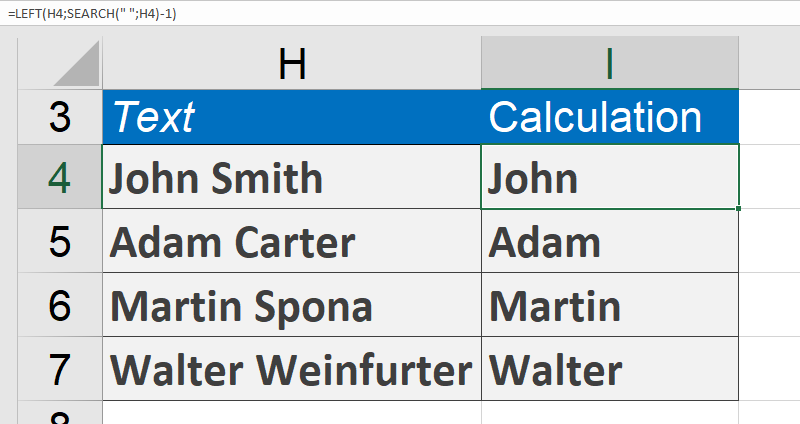
The SEARCH function determines the position of the space between the first and last names. Subtracting 1 gives the position of the last character of the first name (the number of characters from the left).
Additional Examples
- =LEFT(« steamboat »; 5)returns steam.
- =LEFT(« gazelle »; 4)returns gaze.
- =LEFT(« Oliver Kiel »; 5)returns Oliver.
- =LEFT(« Excel »; 1)returns E.
- =LEFT(« Excel »; 2)returns Ex.