
Its returns the logarithm of a number to a specified base. If the base is omitted, it defaults to 10 (common logarithm).
Syntax
LOG(number; [base])
Arguments
| Parameter | Requirement | Valid Input |
| number | Required | Positive real number (> 0) |
| [base] | Optional | Positive real number ≠ 1 (default = 10) |
Key Concepts
- Mathematical Definition:

-
- Inverse of Exponentiation: LOG(number, base) reverses base^y = number.
- Special Cases:
- LOG(10) = LOG10(10) = 1 (base 10)
- LOG(8, 2) = 3 (since 23=823=8)
- Error Handling:
- #NUM! → number ≤ 0 or base ≤ 0 / base = 1
- #VALUE! → Non-numeric inputs
Examples
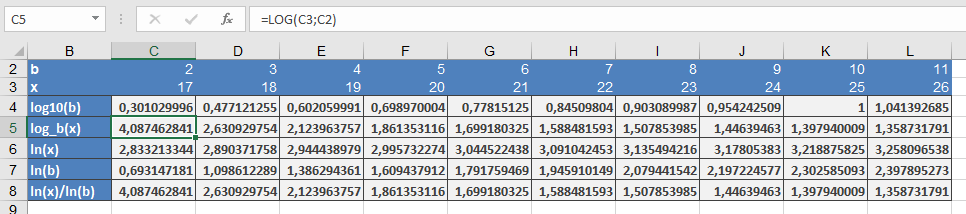
Comparison with Other Log Functions
| Function | Base | Example |
| LOG() | Custom | =LOG(27, 3) → 3 |
| LOG10() | 10 | =LOG10(1000) → 3 |
| LN() | *e* | =LN(20) ≈ 3.0 |
Why This Matters
- Simplifies multiplicative problems into additive ones (e.g., compounding interest).
- Essential in data science (log-scaling) and engineering (signal processing).
- Base 2 is critical in computer science (binary trees, Big-O notation).
Common Errors & Fixes
| Error | Cause | Solution |
| #NUM! | number ≤ 0 or invalid base | Ensure inputs are positive and base ≠ 1 |
| #VALUE! | Text input | Use =IFERROR(LOG(A1,B1), « Check Input ») |