This function returns values from the lognormal distribution where the natural logarithm of the random variable follows a normal distribution with parameters μ (mean) and σ (standard_dev). The probability density function (PDF) is given by:

Syntax
LOGNORM.DIST(x; mean; standard_dev; cumulative)
Arguments
- x (required): Evaluation point (x>0x>0)
- mean (required): Mean of ln(x)ln(x) (μμ)
- standard_dev (required): Standard deviation of ln(x)ln(x) (σ>0σ>0)
- cumulative (required):
- TRUE: Returns cumulative distribution (CDF):
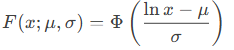
where ΦΦ is the standard normal CDF.
-
- FALSE: Returns probability density (PDF)
Background
The lognormal distribution models multiplicative processes where:
- Skewness: Right-tailed distribution
- Multiplicative effects: If X=eYX=eY with Y∼N(μ,σ2)Y∼N(μ,σ2), then XX is lognormal
- Real-world examples:
- Income distributions (growth rates compound multiplicatively)
- Particle sizes in aerosols
Key properties:
- Mean: eμ+σ2/2eμ+σ2/2
- Variance: (eσ2−1)e2μ+σ2(eσ2−1)e2μ+σ2
Example Calculation
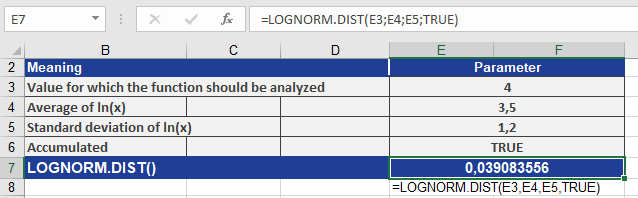
Given:
- x=4x=4
- μ=3.5μ=3.5
- σ=1.2σ=1.2
- Cumulative = TRUE
Compute F(4;3.5,1.2):
- Standardize: z=ln(4)−3.51.2≈−0.747z=1.2ln(4)−3.5≈−0.747
- Evaluate Φ(−0.747)≈0.039084Φ(−0.747)≈0.039084
Result:
LOGNORM.DIST(4, 3.5, 1.2, TRUE) = 0.039084