
This function converts a string to lowercase.
Syntax
LOWER(text)
Arguments
- text(required): The text you want to convert to lowercase.
Background
The LOWER() function is the counterpart of the UPPER() function, which converts a string to uppercase. All uppercase letters are converted to lowercase, while other characters (numbers, symbols, etc.) remain unchanged.
This function is useful for:
- Comparing strings in a non–case-sensitive manner.
- Standardizing text data to lowercase format.
If a numeric value is passed as the text argument, Excel converts it to unformatted text. However, if the result is used in numeric calculations, Excel automatically converts it back to a number.
Example
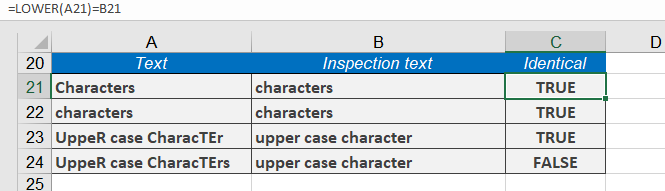
To perform a case-insensitive comparison, you can convert text to lowercase. For example:
- =LOWER(« Letters »)= »letters »returns TRUE.
- =LOWER(« LETTERS »)= »letters »also returns TRUE.
Additional Examples
- =LOWER(« John Smith »)returns john smith.
- =LOWER(« Excel »)returns excel.
- =LOWER(« eXCEL »)returns excel.
- =LOWER(TODAY())returns 40450.