
This function returns the largest value from a set of arguments.
Syntax:
MAX(number1; [number2]; …)
Arguments:
- number1 (required): First number, cell reference, or range to evaluate
- number2,… (optional): Additional numbers, references, or ranges
Key Features:
- Data Handling:
- Accepts numbers, empty cells, logical values (TRUE/FALSE), and text representations of numbers
- Ignores text values that cannot be converted to numbers
- Returns 0 if no numbers are found in the arguments
- Range Behavior:
- When evaluating ranges or arrays:
✓ Processes only numerical values
✓ Automatically ignores empty cells, text, and logical values - To include logical values and text numbers, use MAXA()
- When evaluating ranges or arrays:
- Error Handling:
- Returns errors if any argument contains unprocessable text or error values
Comparison:
- For minimum values, use MIN() with identical argument rules
- For more inclusive calculations, use MAXA()/MINA()
Example:
As Accounting Manager, you need to find the highest sales figure from two years of unsorted data (see Figure below).
Implementation:
=MAX(C3:C26)
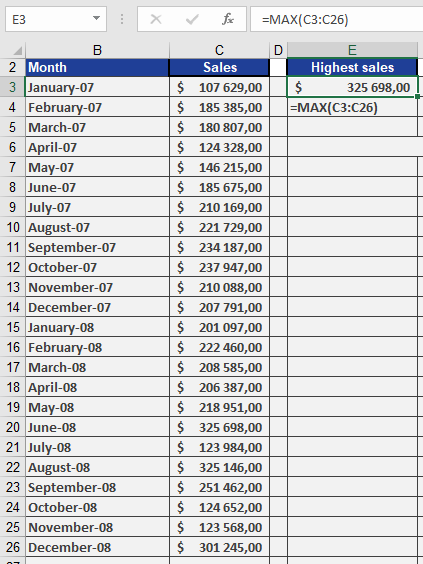
This formula will return the single highest value from cells C3 through C26, regardless of their position in the range.
Note: The function is particularly useful for:
- Identifying performance outliers
- Finding threshold values
- Data validation checks