
The MAX function returns the maximum or largest number in a given set of values or arguments. The MAX function ignores text and logical values in its calculations.
The MAX function uses the following argument:
=MAX(number1; [number2]; …)
Number1 (Required Argument): This is the range of cells from which the highest number will be returned.
Number2 (Optional Argument): Here, up to 255 additional numbers can be included.
USING THE MAX FUNCTION
With the table given below, find the maximum number using the MAX function.
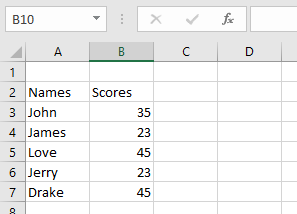
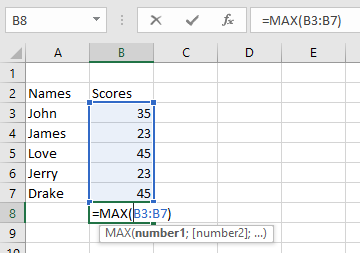
To find the maximum number using the MAX function, follow the steps below:
- Select an empty cell and type in the function name and its arguments:
=MAX(B3:B7)
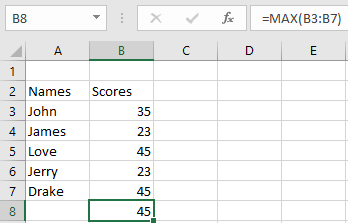
- Click Enter and the result will be 45 as shown in the table below.
NOTE: Keep these in mind when using the MAX function:
- A #VALUE! error occurs when non-numeric values are provided
- The MAX function returns 0 for arguments without numbers
- To include logical values and text representations of numbers, use the MAXA function
- Arguments can be numbers, names, arrays, or references containing numbers
- Empty cells, logical values, and text are ignored
- Error values or uninterpretable text in arguments will cause errors