
This function returns the determinant of a square matrix (array). The determinant is a scalar value that encodes key properties of the matrix, such as invertibility.
Syntax
MDETERM(array)
Argument
| Parameter | Requirement | Valid Input |
| array | Required | Square numeric array (e.g., 2×2, 3×3) |
Key Properties
- Input Rules:
- Must be a square matrix (equal rows/columns).
- Supports:
- Cell ranges (e.g., A1:B2)
- Array constants (e.g., {1,2;3,4})
- Named ranges
- Rejects:
- Non-numeric/text entries → #VALUE!
- Non-square arrays → #VALUE!
- Mathematical Formulas:
- 1×1 Matrix: det([a]) = a
- 2×2 Matrix:
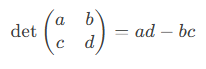
-
- 3×3 Matrix (Sarrus’ Rule):

-
- n×n Matrix: Computed via LU decomposition in Excel.
- Critical Interpretation:
- det = 0 → Matrix is singular (no inverse, linearly dependent rows/columns).
- det ≠ 0 → Matrix is invertible.
Examples
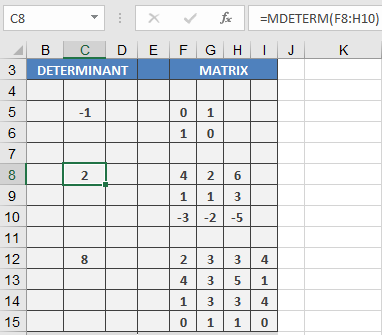
- Real-World Use:
- Check invertibility before using MINVERSE().
- Solve linear systems (Cramer’s Rule).
Why This Matters
- Engineering: Stability analysis of systems.
- Economics: Input-output models.
- Computer Graphics: Transformation matrices.
Error Handling
| Error | Cause | Solution |
| #VALUE! | Non-square/non-numeric input | Ensure square numeric matrix |