
Returns the middle value of a numeric dataset when sorted in ascending order. Exactly half of the data points will be greater than the median, and half will be less than the median.
Syntax
MEDIAN(number1; [number2]; …)
Arguments
- number1 (required): First number, cell reference, or range
- number2,… (optional): Additional values or ranges
Calculation Method
- For odd-numbered datasets:
- Returns the exact middle value
- Example: For 5 values → Returns the 3rd sorted value
- For even-numbered datasets:
- Returns the average of the two middle values
- Example: For 6 values → Averages the 3rd and 4th sorted values
Key Properties
- Outlier resistance: Not affected by extreme values
- Data requirements: Works with ordinal or higher measurement scales
- Stability: Insensitive to changes in extreme values
- Missing data: Automatically ignores blank cells and text
Example. Suppose you are the manager of the software company’s marketing department and you want to evaluate the website for the past year. The evaluation includes all clicks in all website areas. Now you want to calculate the median to get the mean value in this data set for the website visits in the past twelve months.
This example calculates the median from the two mean values in the data sets, because the number of elements is even (see figure below).
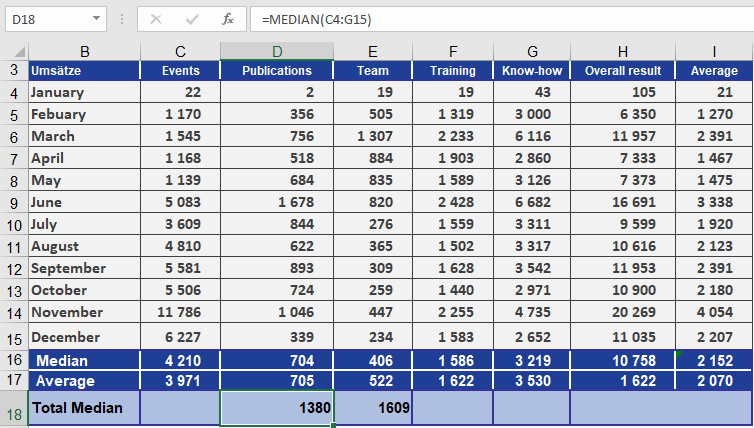
If you sort the events, you can see that the means are July (3,609) and August (4,810). These two values are added by the MEDIAN() function and divided by 2. The result is a median of 4,210. If the example included a 13th month, the median would be the seventh value in the sorted data set