
The MEDIAN function calculates the middle value of a given set of numbers. For example, the function returns 3 in =MEDIAN(1;2;3;4;5).
The MEDIAN function contains the following arguments:
=MEDIAN(number1; [number2]; …)
Number1 (Required Argument): The range of one or more cells containing values for median calculation.
Number2 (Optional Argument): Additional numbers to include (up to 255 arguments).
USING THE MEDIAN FUNCTION
Using the table below, let’s calculate the median of numeric data:
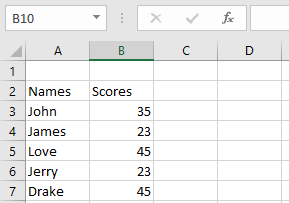
- Select an empty cell and enter:
=MEDIAN(B3:B7)
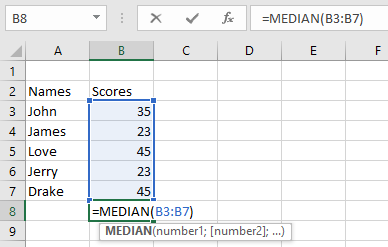
- Press Enter – the result will be 35 (as shown below).

NOTE: Important MEDIAN function behaviors:
- Returns errors if arguments contain uninterpretable text/errors
- Accepts numbers, named ranges, arrays, or number-containing references
- Ignores empty cells, logical values, and text entries
- For even-numbered sets: returns average of two middle values