
The MID() function extracts characters from the middle of a text string, starting at a specified position (start_num) and returning a defined number of characters (num_chars). The MIDB() function is used for double-byte characters, where num_bytes specifies the length in bytes.
Syntax
MID(text; start_num; num_chars)
MIDB(text; start_num; num_bytes)
Arguments
- text(required): The string from which characters are to be extracted.
- start_num(required): The starting position for extraction (1-based index).
- num_chars/num_bytes(required): The number of characters/bytes to extract.
Background
The MID() function is useful for extracting substrings from structured data like ZIP codes, product IDs, or ISBNs. It works alongside LEFT() and RIGHT() for flexible text manipulation.
Important Notes:
- Returns an empty string (« ») if start_numexceeds the string length.
- Returns all remaining characters if start_num + num_charsexceeds the string length.
- Returns #VALUE!if:
- start_numis less than 1.
- start_numis negative.
Example
To extract a product group from a 10-digit item number (e.g., 2301511290), where:
- Positions 1–2 = Main product group.
- Positions 3–5 = Product group.
- Positions 6–10 = Product number.
The formula:
=MID(« 2301511290 »; 3; 3)
returns 015 (the product group).
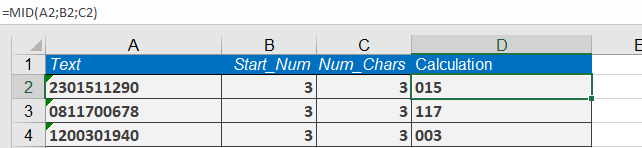
Additional Examples:
- =MID(« intercontinentalflight »; 1; 5)→ inter
- =MID(« gazelle »; 1; 4)→ gaze
- =MID(« gazelle »; 4; 4)→ elle
- =MID(« Louis »; 2; 3)→ oui
- =MID(« Excel »; 1; 2)→ Ex
- =MID(« Excel »; 2; 3)→ xce