Returns the smallest numeric value from a set of arguments.
Syntax
MIN(number1; [number2]; …)
Arguments
- number1 (required): First number, cell reference, or range
- number2,… (optional): Additional values/ranges
Background
- Works identically to MAX() but returns minimum instead of maximum value
- Ignores empty cells, text, and logical values
- Returns 0 if no numeric values are found
- Detailed behavior explained in MAX() function documentation
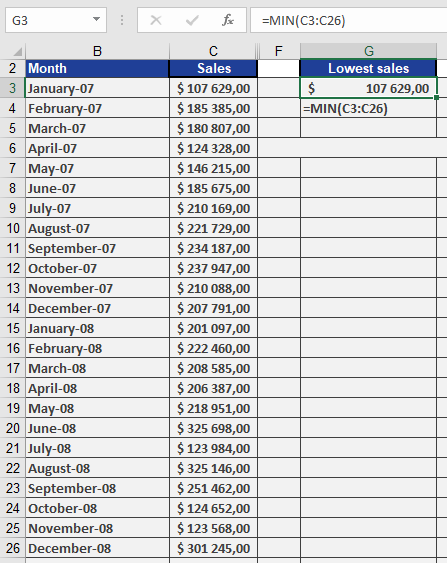
Example. The software company wants to find the smallest number of sales in a given period in a sales table. MIN() returns $107,629 for January from the unsorted data set (see figure below).