
The MIN function returns the smallest numeric value from a given set of values. The function ignores text entries and logical values (TRUE/FALSE) in its calculations.
The MIN function uses the following syntax:
=MIN(number1; [number2]; …)
Number1 (Required Argument): The first number, cell reference, or range containing numeric values to evaluate.
Number2,… (Optional Argument): Additional numbers or ranges to include (up to 255 total arguments).
USING THE MIN FUNCTION
Using the table below, we’ll find the smallest number with the MIN function.
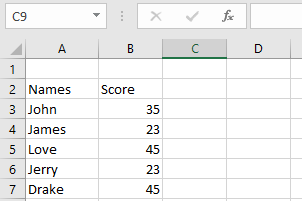
To determine the minimum value:
- Select an empty cell and enter:
=MIN(B3:B7)
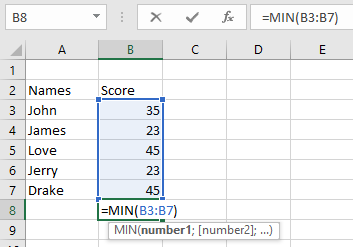
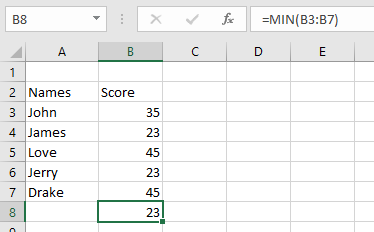
- Press Enter to display the result: 23 (as shown below).
NOTE: Important MIN function behaviors:
- Returns #VALUE! error if non-numeric data is provided
- To evaluate logical values and text-formatted numbers, use MINA instead
- Accepts numbers, named ranges, arrays, or number-containing references
- Automatically ignores:
- Empty cells
- Text entries
- Logical values
- Returns 0 for arguments without valid numbers
- Returns errors when arguments contain:
- Uninterpretable text
- Error values