The MINA function returns the smallest value in a dataset, evaluating:
- Numbers
- Text representations of numbers
- Logical values (TRUE/FALSE)
Syntax
MINA(value1; [value2]; …)
Arguments
| Argument | Requirement | Description |
| value1 | Required | First value, cell reference, or range |
| value2,… | Optional | Additional values/ranges (1-255 total) |
Value Conversion Rules
| Data Type | Conversion | Example |
| Numbers | Used as-is | 42 → 42 |
| Text numbers | Converted to numeric | « 100 » → 100 |
| Logical TRUE | Treated as 1 | TRUE → 1 |
| Logical FALSE | Treated as 0 | FALSE → 0 |
| Text strings | Treated as 0 | « Text » → 0 |
| Empty cells | Ignored | [blank] → excluded |
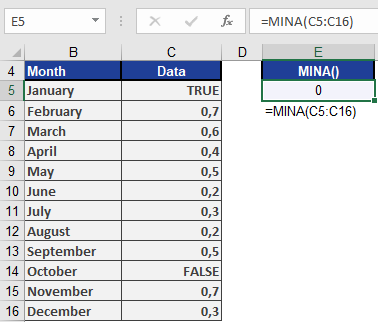
Example. Using the same example as for MAXA(), the MINA() function returns 0 because the smallest value is the logical value FALSE (see figure below).